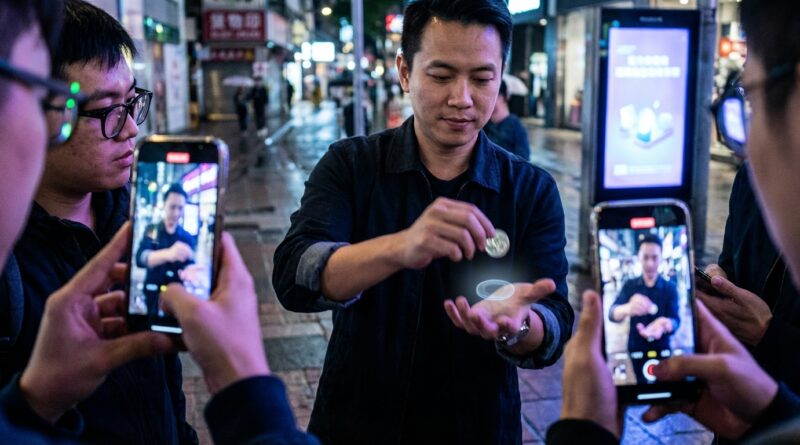
From Smart Glasses To Street Miracles: How To Build One Invisible ‘Tech‑Camouflage’ Switch That Looks 100 Percent Sleight Of Hand
You can feel the audience tighten up the second a phone comes out. That is the new headache. The trick may be clean, your timing may be solid, but if a spectator even smells an app, a smart-glasses overlay or some hidden camera trick, they stop watching your hands and start reverse-engineering your gear. That kills the effect fast. The fix is not to avoid technology completely. It is to handle it so naturally that the device reads like background noise, not the method. For sleight of hand magic with phones and technology, the smartest move right now is to build one switch that hides inside an everyday screen action people already understand. My favorite is the “screen-clean switch.” It looks like you are simply wiping a smudge off a phone or glasses lens. In that tiny, innocent moment, you can ring in, ring out, ditch or steal a small object while the audience remembers only one thing. You tidied the screen. Nothing more.
⚡ In a Hurry? Key Takeaways
- Build your switch around a normal phone action, like wiping the screen, so the tech feels ordinary and the magic feels manual.
- Keep the object small, keep the phone still, and let the dirty work happen during a justified grip change, not during a flashy gesture.
- If the handling looks too careful or too “demo-like,” people will credit software instead of skill, so rehearse for casualness, not just speed.
The one invisible tech-camouflage switch
The basic idea is simple. A phone, smartwatch face, smart-glasses case or small tablet becomes your temporary cover object. Not a magic prop. Just a thing people expect to see.
You hold the device in one hand and a small object in the other. Think coin, folded billet, SD card, ring, chip, key tag, mini prediction, USB stick, or a signed sticker folded tiny. As attention shifts to a fingerprint smear, notification reflection or “let me show you something on screen” moment, you bring the hands together. During the wipe or screen adjustment, the visible object is switched for a hidden match, or quietly ditched behind the device and later reproduced elsewhere.
It works because the audience has a ready-made explanation for the action. People touch, rotate and wipe phones all day long. They do not file that under “suspicious.” They file it under “normal human behavior.” That is what makes this such a useful answer for sleight of hand magic with phones and technology.
Why this fools people in 2026
Today’s spectators are not just watching the effect. They are also judging the method category. They ask themselves, “Was that a move, or was that software?”
If your handling screams “look at the phone,” they assume trick app. If your handling screams “look at my empty hand,” they assume hidden load. The sweet spot is a small, forgettable action that belongs to the device but does not spotlight the device.
A screen wipe does exactly that.
What the audience thinks happened
They think you cleaned the screen. Maybe adjusted glare. Maybe rotated the phone so they could see better. That simple memory is gold, because it pushes the device into the background and lets the effect read as old-school skill.
What actually happened
You used the phone as a visual wall and a reason for a grip change. The wipe covered the moment of contact. The reset of the fingers did the rest.
How to build the handling
Step 1: Pick the right object
Start small and flat-ish. Coins work. Folded paper works. Thin tokens work. Rings can work if your hands are comfortable with them, but they add angle issues. Avoid anything that clacks loudly against the device unless the sound is part of the routine.
Best beginner choices:
- Duplicate coin or token
- Folded prediction slip
- Sticker dot or mini label
- Business card corner with writing on it
Step 2: Give yourself a reason to approach the screen
This is where many performers blow it. They invent a fake reason. Spectators can smell that a mile away.
Use one of these instead:
- “Sorry, there’s a smudge, I want you to see this clearly.”
- “The glare is bad here, one sec.”
- “Let me lock the screen so nothing pops up.”
- “Can you check that this is in frame?”
Every one of those lines supports normal handling. None of them scream “secret move incoming.”
Step 3: Hide the switch inside the wipe
The visible object is held at the fingertips of the active hand. The device is in the other hand. As the active hand crosses the face of the phone with a microfiber cloth, shirt hem, thumb pad or finger sweep, the object goes behind the phone for an instant.
That is the moment.
You either:
- leave the original object behind the phone and come away empty or with a duplicate,
- pick up a hidden object from behind the phone and bring it into view,
- or swap one for the other during the covered contact.
The key is that the phone should not jerk or wobble. The device must look like the stable thing in the scene. If the phone moves too much, people start assigning method to the gadget.
Step 4: Separate cleanly
After the wipe, do not freeze. Do not stare at your hands. Continue the sentence you were already saying. Show the screen briefly if that fits the routine, then move on. The move is over. The trick now needs air.
The mechanics that matter most
Finger pressure
Most bad switches fail because the performer grips too hard. The object should ride the fingers, not get strangled by them. Light pressure reads casual. Death grip reads “I am definitely hiding something.”
Phone angle
Hold the screen at a slight inward tilt, not flat to the ceiling and not dead vertical to the audience. That gives you a natural shield without looking like you are building a wall.
Tempo
Do not make the wipe the slowest action in your life. That is a red flag. Real people wipe screens quickly. One stroke or two at most.
Eye line
Look at the spectator, then at the thing you want them to notice, not at the switching hand. Your eyes are still one of the strongest pieces of misdirection you have, even in a tech-heavy set.
What this switch is perfect for
This handling shines when you want modern props on stage or in close-up without making the effect feel app-based.
- A coin changes to a transit card while you “clear the screen” for a photo.
- A folded prediction appears as you rotate the phone for someone to read a note.
- A ring vanishes near a smart-glasses case, then appears clipped inside it.
- A signed sticker is switched for a duplicate during a “let me zoom in” moment.
The audience sees technology. But they remember hands.
Common mistakes that make people think “hidden app”
You introduce the device too early
If the phone is in play long before the effect needs it, spectators start treating it as a suspect. Bring it in late. Give it one clear job.
You overprove the device
“This is a normal phone, inspect it, no special case, no app, no edit.” That sounds exactly like something said before a trick phone is used. Relax. Treat the device as boring.
You frame the screen like a magic window
The second the phone becomes the star, the audience assumes digital method. The phone should support the sequence, not carry the mystery.
Your hands dip out of view
If the object disappears behind the lower edge of the phone and stays hidden for too long, the audience fills in the blanks with technology. Keep the covered moment tiny.
A practice drill that actually helps
Set your phone to selfie video and record ten reps. Watch with the sound off first. That tells you if the action looks justified visually. Then watch with the sound on. You may hear tiny clicks, case taps or nervous verbal fillers you did not notice in the moment.
Next, hand the clip to a non-magician friend and ask one question only: “At any point, did this look like the phone was doing the trick?” Do not explain the method. Their answer matters more than your theory.
How to script it so the magic reads as skill
Your words should quietly lower the importance of the tech.
Good lines:
- “Hold on, I’ve got fingerprints all over this.”
- “I just want you to see this clearly.”
- “Keep your eyes on the coin, not the screen.”
That last line is especially useful. It tells spectators, without sounding defensive, that the screen is not where the secret lives. And if your handling is good, they will believe you.
Who should use this, and who should skip it
Use it if
- You already do basic switches confidently
- You perform for phone-savvy crowds
- You want a modern look without a “tech trick” label
- You post clips that will be slowed down and argued over online
Skip it for now if
- You still struggle with natural grip changes
- You rely on oversized objects
- You perform in very harsh side angles with no control
- You are tempted to make the phone the whole presentation
If you are not ready, that is fine. This is not about adding gadgets. It is about making modern objects disappear into your handling.
At a Glance: Comparison
| Feature/Aspect | Details | Verdict |
|---|---|---|
| Naturalness | A quick screen wipe or angle adjustment matches everyday phone behavior and gives cover for a small switch. | Excellent when kept brief and casual |
| Difficulty | The move itself is not knuckle-busting, but timing, grip relaxation and device stability take practice. | Intermediate |
| Best Use Case | Close-up sets, social clips, trade show work and any routine where a phone appears naturally without becoming the method. | Strong fit for modern magic audiences |
Conclusion
The big shift right now is not just new gadgets. It is new suspicion. In the last twenty-four hours alone, some of the most shared magic clips online have sparked the same argument in the comments. Was that real sleight of hand, or just clever tech dressed up as magic? That is the world working magicians are dealing with now. Phones show up on stage. AR graphics sit in the background. Smart-glasses style footage is everywhere. So the challenge is no longer just fooling the live crowd. It is making the effect survive replay, pause, zoom and public debate.
That is why one good tech-camouflage switch is worth having. Not a whole toolbox. Just one reliable, practical handling. The screen-clean switch gives you a way to bring a modern device into the scene, move a small object in or out of frame, and still have the moment land as hand skill instead of software. If you keep the action ordinary, the timing tight and the device boring, the audience stops blaming the tech and starts crediting the magic where it belongs. In 2026, that is not a small upgrade. It is survival.