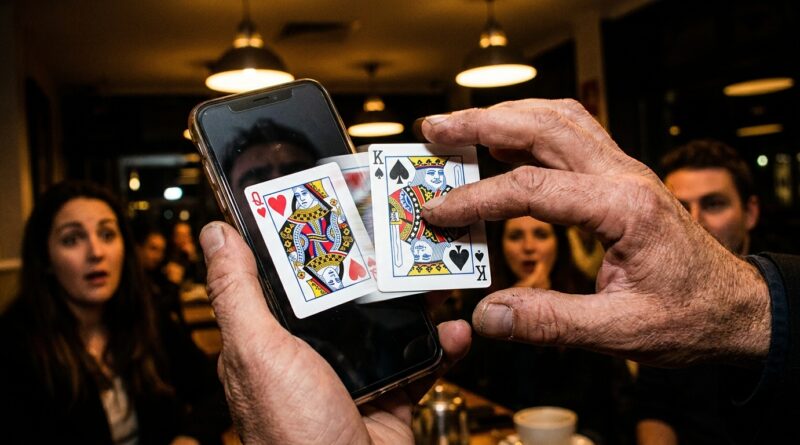
From Static Photos To Living Miracles: Build One ‘Swipe‑Palm Change’ That Turns Any Still Image Into Real‑Time Sleight Of Hand
You know the feeling. You post a beautiful shot of a card, a coin, maybe a prediction sitting in your palm, and it gets a quick glance before people keep scrolling. That stings, especially when you know the real magic happens in your hands, not in a frozen thumbnail. The problem is simple. Static photos look polished, but they do not feel alive. And once viewers suspect editing, filters, or some AI cleanup, the mystery leaks out fast.
A smart fix is to build one touch-driven moment into the image itself. Think of it as a swipe-palm change. You show a still image on your phone, place your real hand over the screen, swipe or lift, and the object in the photo appears to change in sync with your live action. Done well, it looks like the photo obeyed your fingers in real time. That gives you a new sleight of hand technique for visual card changes without camera tricks, and it works because the method feels physical, not digital. To the audience, the phone stops being a display and starts acting like a prop.
⚡ In a Hurry? Key Takeaways
- Use a timed hand cover and screen-matched reveal to make a still image change live, without camera edits.
- Start with a bold object swap, like red card to black card or silver coin to copper coin, so the change reads instantly on small screens.
- Keep angles tight and brightness controlled. The cleaner the handling, the less it feels like a phone trick.
Why this works better than another edited reel
People are tired of suspiciously perfect visuals. They may not know the method, but they know when something feels processed. That is why a live, touch-based effect lands so hard. It gives the eye a real event to track.
The audience sees three things at once. A static photo. A real hand. A change that happens at the exact moment the hand passes. That combination is strong because it mixes two realities. The image looks fixed, but your touch changes it anyway.
For magicians, that means you are not trying to beat CGI with better CGI. You are changing the game. You are using honest handling to create a visual that still feels impossible.
What the “swipe-palm change” actually is
At heart, this is a choreographed switch between what is on the screen and what the audience thinks they are seeing during the cover of your hand.
The simple version
You prepare two matching visuals on your phone. Photo A shows, say, the Queen of Hearts. Photo B shows the Queen of Spades in the same position, same lighting, same crop. When your palm covers the screen, you trigger the change and uncover at the right beat. The audience remembers one uninterrupted action.
That sounds easy because, in one sense, it is. The hard part is not the phone. It is the timing, touch path, and body position. That is where the sleight of hand part comes in.
Why it feels like sleight, not just a tap
If you simply tap and reveal, it looks like a phone feature. If your hand swipes, pauses, applies gentle pressure, and then lifts as if dragging the object through the image, the mind reads it as manipulation. You are not changing a file. You are changing the thing inside the frame.
How to build the effect from scratch
1. Pick an object with a clean silhouette
Start with cards, coins, billets, or a folded prediction. Avoid busy items at first. You want an object people can identify in half a second.
Best starter changes include:
- Red card to black card
- Blank-faced card to printed card
- Silver coin to copper coin
- Prediction envelope sealed to open
2. Shoot two nearly identical photos
This matters more than most people think. Put the phone on a stand or stable surface. Lock focus and exposure if your camera allows it. Take Photo A. Change only the object. Take Photo B.
The background must stay still. Same shadows. Same framing. Same distance. If anything jumps, the viewer may not know why it feels off, but they will feel it.
3. Build a simple display sequence
You do not need fancy software. The easiest method is to place the two images in an album and swipe between them, or use a presentation app where one tap advances to the next image. What matters is reliability. If your finger misses the control, the illusion dies on the spot.
For live work, choose the method that you can do blind. Muscle memory beats features every time.
4. Choreograph the hand cover
This is the secret sauce. Your palm should not slap flat onto the screen like you are covering a mistake. It should arrive with purpose.
Try this sequence:
- Display the image clearly for one beat.
- Bring the hand in from the side, not straight at the lens.
- Cover the object first, then the rest of the image.
- Trigger the switch under cover.
- Pause for a fraction of a second.
- Lift the hand as if you have just rubbed or pulled the change into existence.
That tiny pause is important. Without it, the move feels mechanical. With it, the audience connects cause and effect.
Angle awareness is what separates a trick from a miracle
This is where many social clips fall apart in person. On your own phone, from your own eyes, everything looks great. Put one spectator to your left and another slightly behind you, and weak handling gets exposed.
Best viewing window
Keep the phone chest-high to slightly below eye level. Tilt it a touch upward. That reduces glare and helps hide any finger movement on the screen.
Where spectators should stand
Think of a soft semicircle in front of you. People directly to the sides are your problem area. If you are working a live event, take half a step back and naturally square your body before the change. Nobody notices the adjustment, but your angles get much safer.
Watch your own reflection
Glossy screens can betray you. Overhead lights, windows, and bright shirts can all create reflections that compete with the image. Before performing, look at the phone from the audience side and check for glare. This tiny habit saves a lot of awkward re-dos.
How to make it look less like a phone trick
The biggest danger is that spectators think, “He just changed the picture.” You need to steer them away from that thought before it forms.
Use a reason for the touch
Do not say, “Watch this image change.” Instead say something like, “Photos are supposed to keep things still,” or “Let me show you the moment before it happened.” Then your hand enters as if you are testing that rule.
Connect the screen to a real object
A great upgrade is to show the actual card or coin after the visual change. The image changes first. Then the object appears in your hand, pocket, or on the table. That continuation tells the audience the moment on screen was part of a larger physical effect.
Keep the tech invisible
Turn off notifications. Lock orientation. Raise brightness enough to read outdoors, but not so high that the screen screams at the audience. Your phone should feel like a casual object, not a special gimmick you are babying.
Three strong routines you can use right away
The signed-card memory change
Take a photo of a selected card before it is “signed.” Later, display the still image and swipe. The card in the photo now shows the spectator’s signature. This works best if the signature is bold and easy to recognize.
The coin-through-screen moment
Show a coin in the photo resting near the edge of the screen. Swipe downward with your palm. When you lift, the coin is gone from the image and appears under your hand in real life. This is excellent for promo clips because the sequence is short and crystal clear.
The color-change prediction
Display a face-down card in the photo with a visible blue back. Rub the image. The back turns red. Then remove a real red-backed prediction from your pocket or wallet. This one is strong for trade shows and launch events because the color story reads from a distance.
Common mistakes that ruin the illusion
Moving too fast
Fast hands are not always magical. Often they just look guilty. Let the audience register the first image, then create the change.
Using weak contrasts
A seven changes to an eight. A brass token changes to a slightly different brass token. That is not strong enough. Big visual differences are your friend.
Ignoring the border of the phone
If your fingers drift to the same spot every time, people may clock that you are controlling the screen. Vary the gesture so it feels motivated by the object, not by a hidden button.
Forgetting the reveal line
Silence can work, but a short line helps frame the moment. “Pictures hold still. This one didn’t.” That is enough. Short. Clean. Memorable.
Can this play in the real world, not just on Instagram?
Yes, if you build it as a modular beat instead of a full act. That is the smart way to use it.
At a walk-around gig, this can become a quick opener. At a product launch, the image can feature the brand item before it changes. In a promo reel, it gives you a visual hook that still feels honest when replayed slowly.
The trick is not to make the phone the star. You are the star. The phone is just the frame where the impossible starts.
Why this matters right now
Audiences are getting harder to impress with pure visuals because they assume software is doing the heavy lifting. That makes practical methods more valuable, not less. A new sleight of hand technique for visual card changes without camera tricks stands out because it gives people a reason to trust their eyes again.
And once they trust their eyes, the magic hits harder.
At a Glance: Comparison
| Feature/Aspect | Details | Verdict |
|---|---|---|
| Setup difficulty | Needs two matched photos, a reliable image switch, and practiced hand timing. | Easy to build, harder to polish. |
| Live performance value | Plays well in close-up, walk-around, and short social clips when angles are managed. | Very strong if treated as a quick visual beat. |
| Risk of looking edited | Low if the gesture is natural and the reveal links to a real object or follow-up effect. | Much more believable than a flashy camera cut. |
Conclusion
If your magic keeps dying the moment it becomes a still image, this is a practical way to bring it back to life. You are not trying to out-edit the internet. You are giving people something better. A real, angle-aware moment that happens under your hand and survives replay. Right now feeds are flooded with AI visuals, filters and lazy camera edits, so audiences are becoming allergic to anything that looks like editing. A practical, angle-aware sleight that lets you treat a static photo as a living prop gives close-up workers and content-makers something different: a live, touch-driven miracle that feels impossible even when rewatched frame by frame. That helps the Magician Book community stand out by anchoring the effect in honest technique that still plays like visual effects. And for working pros, it is a flexible piece you can drop into walk-around gigs, launch events, or promo reels without rebuilding your whole act.